
Two records in one file: IIM and XMP
IPTC metadata lives in a JPEG in two ways. IIM is the old binary format from the 1990s. Each field has a number, such as 2:120 for the caption, and a length limit in bytes. XMP is the newer text-based record, without hard limits, read by Lightroom, Photo Mechanic and most modern systems.
Many agencies and newsroom archives still read IIM only. A safe rule: fill both records with the same text and stay within the IIM limits. Captioning apps usually do this for you, but it helps to know what happens when the text is too long: it gets cut silently, often in the middle of a name.
The caption: the field that matters most
The caption (Caption/Abstract, IIM 2:120, XMP dc:description) is what the editor reads first and what runs under the photo in print. It holds up to 2,000 bytes. In practice agencies expect one or two sentences in a fixed order:
- date and place,
- the event, e.g. competition and teams,
- who is in the photo, from the left, with their team,
- what they are doing.
Each agency has its own pattern. One starts with a date like 2026.01.28, another with the city in capitals and the date in English. One wants shirt numbers after the names, another does not. That is why each agency’s caption is best built from a template rather than retyped.
Headline and title
The headline (Headline, 2:105, up to 256 bytes) is a short summary, usually without date and place, e.g. “Dončić faces a double team”. The title (Object Name, 2:05) has only 64 bytes, and many agencies use it as a working name or event ID. A long sentence there gets truncated by the agency’s system.
Keywords
Keywords (Keywords, 2:25) are separate entries of up to 64 bytes each. Use single terms: names, teams, sport, competition, city. A year later, when the player has changed clubs, this is what the editor searches the archive by. A dozen accurate keywords work better than fifty random ones.
By-line, credit and copyright
These are the fields people mix up most:
| Field | IIM | Limit | What to enter |
|---|---|---|---|
| By-line | 2:80 | 32 B | The photographer’s name |
| Credit | 2:110 | 32 B | How to credit at publication, e.g. Jane Smith/Agency |
| Source | 2:115 | 32 B | Who supplied the photo, usually the agency |
| Copyright Notice | 2:116 | 128 B | Who owns the copyright, e.g. © 2026 Jane Smith |
Credit and copyright are different things. Credit tells the paper how to credit the photo. Copyright says who owns it. When you shoot for several agencies, the credit changes with each one, while the copyright usually stays yours.
Place and date
City (2:90, 32 B), region (2:95, 32 B), country (2:101, 64 B) and the three-letter country code (2:100, e.g. POL, USA) let editors filter by location. Date created (2:55) and time created (2:60) should come from the camera, not from when you sent the file. If you shoot with two bodies, sync their clocks before the game. Otherwise the photos sort in the wrong order and the agency gets the wrong time.
People in the photo
IIM has no separate field for people. XMP does: Iptc4xmpExt:PersonInImage keeps a list of people independent of the caption text. Sports agencies use it more and more, because it is easier to search than a sentence. Enter full names there, spelled exactly as in the caption.
Why accented names turn into garbage
IIM stores text as bytes and keeps the encoding in a separate field (1:90). When that field says “UTF-8” but the agency’s system ignores it and reads the text as Windows-1250 or Latin-1, “Kraków” becomes “KrakĂłw” and “Gdańsk” becomes “GdaĹ„sk”. Your app is not at fault; the old receiver is.
There are two ways out. For agencies that read UTF-8 correctly, send the full accented names. For those that garble them, set transliteration: “Dončić” becomes “Doncic”, “Łódź” becomes “Lodz”. Keep the limits in mind too: in UTF-8 an accented letter takes 2 bytes, so a 32-byte by-line holds fewer characters than it looks.
Example: one frame, two agencies
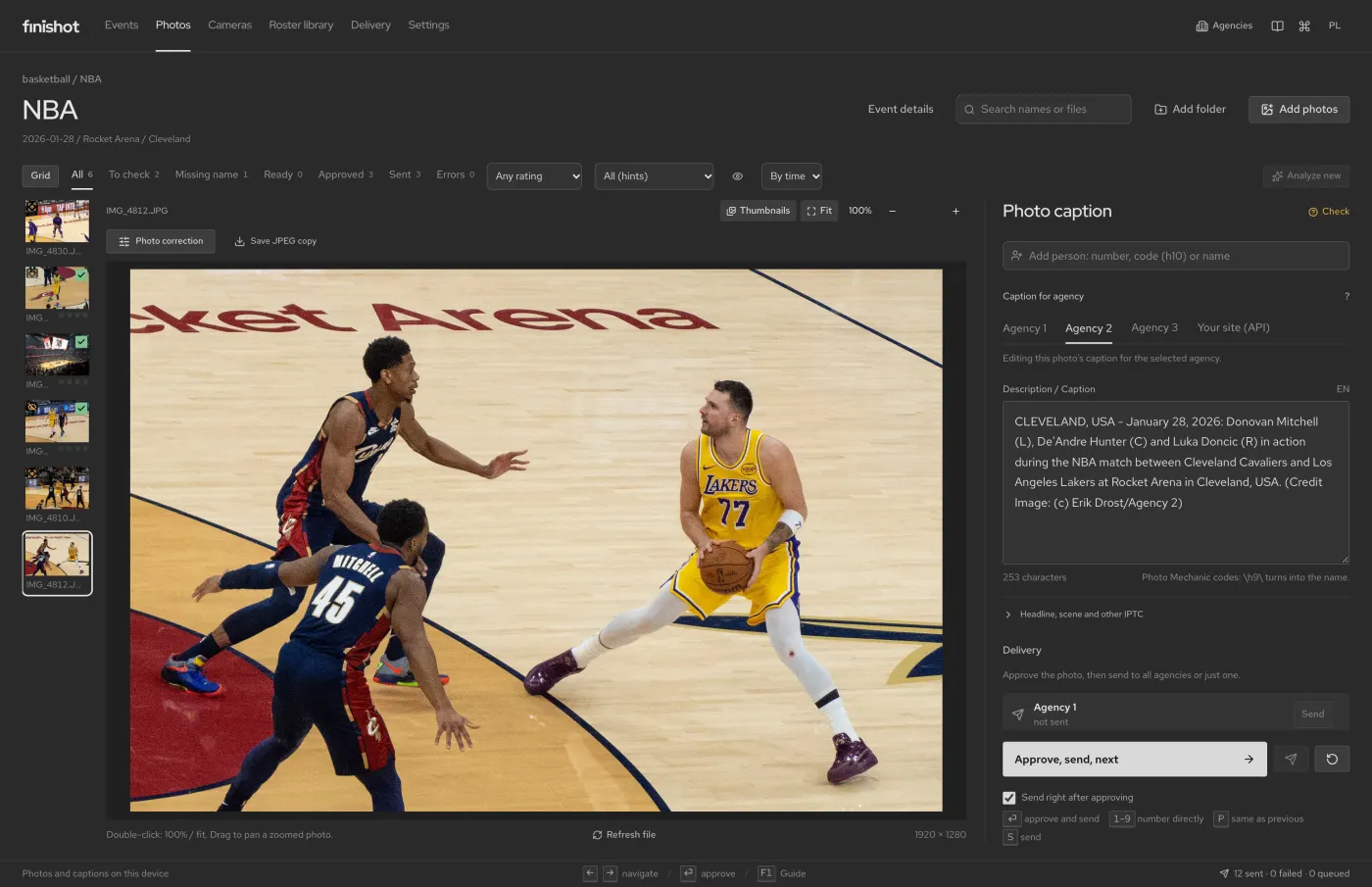
A photo from the Cleveland Cavaliers vs Los Angeles Lakers game. Three players are in the frame: Donovan Mitchell, number 45, De’Andre Hunter, whose number is hidden, and Luka Dončić, number 77. Same data, two templates. A Polish agency gets:
2026.01.28 NBA, Cleveland Cavaliers - Los Angeles Lakers, Rocket Arena, Cleveland, USA. Na zdjęciu: Donovan Mitchell (L), De’Andre Hunter (C) i Luka Dončić (P) podczas akcji.
An English-language agency gets the city in capitals, the date in English, the name without diacritics and its own credit line at the end:
CLEVELAND, USA - January 28, 2026: Donovan Mitchell (L), De’Andre Hunter (C) and Luka Doncic (R) in action during the NBA match between Cleveland Cavaliers and Los Angeles Lakers at Rocket Arena in Cleveland, USA. (Credit Image: (c) Erik Drost/Agency 2)
Note three things. The positions in brackets tell the editor who is who without checking numbers. Hunter’s name appears although his number is hidden, because the photographer typed it in; the software did not guess. And “Dončić” and “Doncic” are the same person, written the way each receiver expects.
Checklist before you send
- Caption in the agency’s order: date, place, event, people from the left, action.
- Names spelled the same in the caption, the keywords and the people field.
- The right credit for this agency.
- Date and time from the camera, body clocks in sync.
- Accented names or transliteration, depending on the receiver.
- No field over its IIM limit.
Each agency’s template fills the caption, headline, keywords, credit and people. You see the IIM byte length next to each field before anything goes out.
Questions
How many characters fit in an IPTC caption?
In IIM the Caption/Abstract field is limited to 2,000 bytes. In UTF-8 an accented letter takes 2 bytes. XMP has no such limit, but some agencies read IIM only.
What is the difference between Credit and Copyright?
Credit (2:110) tells the publication how to credit the photo, e.g. “Jane Smith/Agency”. Copyright Notice (2:116) says who owns the copyright.
Is filling in XMP enough?
Not always. Lightroom and newer systems read XMP, but many agency FTP servers and archives still read IIM. Fill in both.